

Inserm staff: use your Inserm password
Inserm staff use their Inserm account: cerabz.abz@vafrez.se and the corresponding password. Find out more about your Inserm password (in french)
Non-Inserm staff: create an Eva3 account
People who are not paid by Inserm must create and activate a dedicated account to access Eva3.
Create your Eva3 account
- Go to the Eva3 account creation page
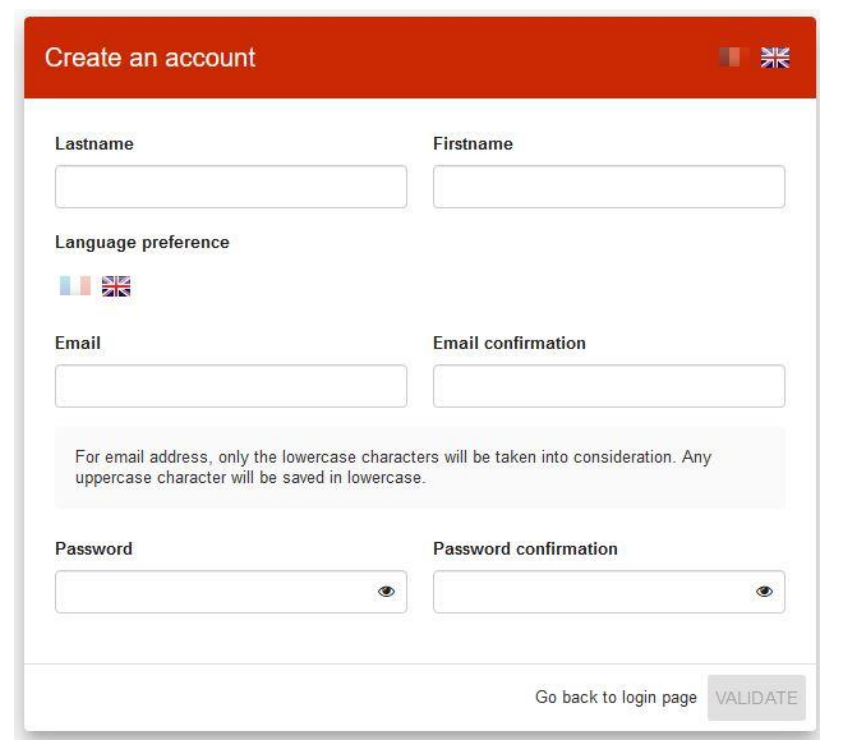
- Complete the following fields:
- Last name: first name in upper case.
- First name: main first name with the first letter in upper case and the rest in lower case.
- Preferred language: French or English.
- Email: permanent email address.
- Important: this address will be used as your login to Eva3.
- Confirm e-mail: e-mail address identical to that in the Email field.
- Password: sequence of at least 8 characters, including at least: 1 number, 1 letter, 1 upper case, 1 lower case.
- Confirm password / same character sequence as in Password field.
- Make a final check that there are no errors and click on Validate.
- The following message appears: “An e-mail has been sent to your e-mail address. Please click on the link to activate your account“. Click on OK
Activate your account within 48 hours
- Check the e-mail inbox attached to your Eva3 account e-mail address. You will receive a message entitled “[INSERM] – Account activation” sent by “ar_cnf_ercbaqer@vafrez.se”. Warning: if you don’t see a message, check your spam, junk, trash, deleted or archive folders.
- Click on the “Activate your account” link. This link is valid for 48 hours. After this time, write to fhccbeg.qfv@vafrez.se. A new activation e-mail will be sent to you as soon as possible.